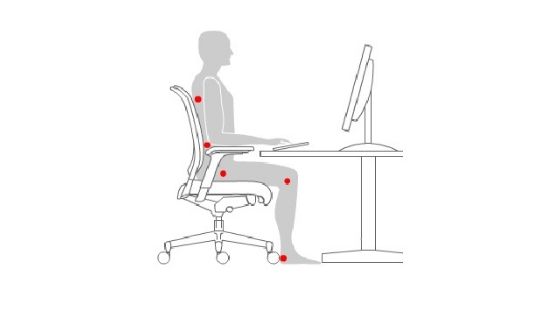
Gaming chairs are no longer missing from your gaming setup these days. Gaming chairs are perfect for a better gaming experience. These chairs are made in such a way that you can sit behind a screen for extended periods of time without any back or neck issues. A good gaming chair will ensure that you are always in the correct position, as injury can result if this is not the case. In addition, gaming chairs can also be used as office chairs, and we still work a lot from home at the moment. Even when working from home, having a comfortable chair is important. What is the correct posture for a gaming chair? How can I ensure correct posture at all times? You can read it in this blog from SB Supply!
Why gaming chairs?
Gaming chairs have several advantages over regular office chairs. First, they are ergonomic. This means that chairs can adapt to people's conditions and characteristics so that we can function in the best possible way. Why is this so important? Everyone has a different physique and body type. A non-ergonomic chair may be comfortable for one person but not for another. You can adjust your gaming chair to fit just about anyone!
The gaming chair is covered with a cushion that conforms to your body. Often these chairs also come with additional adjustable neck and/or back cushions. You can adjust these so you're always comfortable, even if you stay in the same position for long periods of time. Being able to sit comfortably for long periods of time can also reduce stress. If you're playing an intense game or working from home for a long time, back or neck pain can cause unnecessary stress.
Want to know more about gaming chairs that can be used as office chairs? In this blog you can read all about it!
Important aspects of gaming chairs
In addition to gaming chair ergonomics, there are a few other aspects that are important to a good gaming chair: seat height, seat depth, and seat width.
Seat height: The correct seat height will naturally vary according to the height of the person sitting in the chair. But there are several important aspects to ensure that you always maintain the correct seat height. You should be able to sit on the backrest with your feet flat on the floor. If this is not the case, adjust the height of the chair. Also make sure you still have some room between the seat and your thighs. You should be able to place your hands under your thighs while your feet are still flat on the floor. Failure to do so may result in injury. Are you tall and looking for a gaming chair, looking for a chair that is especially suitable for tall people.
Seat Depth: Seat depth is related to the way your thighs rest on the chair. Get a good seat depth by leaning your back against the backrest and sitting all the way to the back. The back of the knee should not touch the front of the chair and there should be a small open space. Aren't you that tall and there's no space between the back of your knees and the front of the chair? Then check out our chairs for smaller people.
Seat Width: Your hip width is important to seat width. If you can sit comfortably on the seat of a gaming chair without your legs touching the armrests, then you have the perfect seat width. If this is not the case, you can always look into chairs for heavier and larger people.
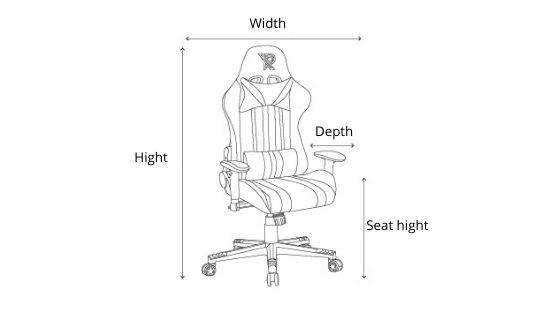
If these three aspects are not correct, injury can result. So, take a close look at the chair's specs and make sure to adjust the chair to fit you exactly.
Important parts of a gaming chair
Gaming chairs are made up of many parts. But there are three parts that determine whether you have a good posture: the seat, the backrest, and the armrests.
Seat: As mentioned in the seat depth bullet point, it's important that the back of your knees don't touch the front of the chair. There should be a small open space. It's also important to keep your knees at a 90° angle, which is better for your back and legs.
Backrest: It should fit your spine perfectly. In most cases, the slightly curved backrest ensures the ultimate sitting position. It is important that your entire back is touching the backrest. With an ergonomic gaming chair, you can adjust it all yourself. In this case, choose a gaming chair with an adjustable backrest.
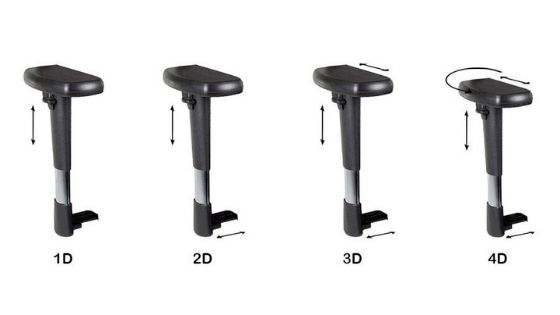
Armrests: The last important part of a gaming chair is the armrests. These must be able to be fully portable while you work or play from home. They must be able to move up and down, and be able to extend and retract. Also check the length of the armrests, they should be long and wide enough for your elbows and forearms to rest comfortably on them. Preferably at an angle of 90°. The ideal height for the armrests is the same height as the table you are sitting on. If this is the case, you will avoid the risk of neck, shoulder and back discomfort. Different armrests are different. Here you can see at a glance:
- 1D Armrest: The 1D armrest can only be adjusted in height. With these armrests, you can place your arms at the correct height and provide 90° arch support.
- 2D Armrest: The 2D armrest can be adjusted in height and width. Is your torso wide or narrow? Width adjustment can place the armrests closer or further away from the body.
- 3D Armrest: The 3D armrest is adjustable in height, width and depth. The top of the armrest can be moved forward or backward. This allows you to determine the distance from the armrest to the table for a more ergonomic sitting position.
- 4D Armrest: The 4D armrest is adjustable in height, width, depth and comes with swivel arm pads. While typing, you can turn the stand slightly in or out if you use the mouse a lot. This way, your arms are always fully supported.
What's the best way to sit in a gaming chair?
In short: Make sure your feet are flat on the ground. The back of your knee should not touch the front of the chair. Make sure you have enough space to move between the railings. Your entire spine should be fully resting on the backrest, and your armrests should be adjusted to the correct height. If all is well, you can assure yourself that the chances of neck, shoulder, and back discomfort are minimized.